Description
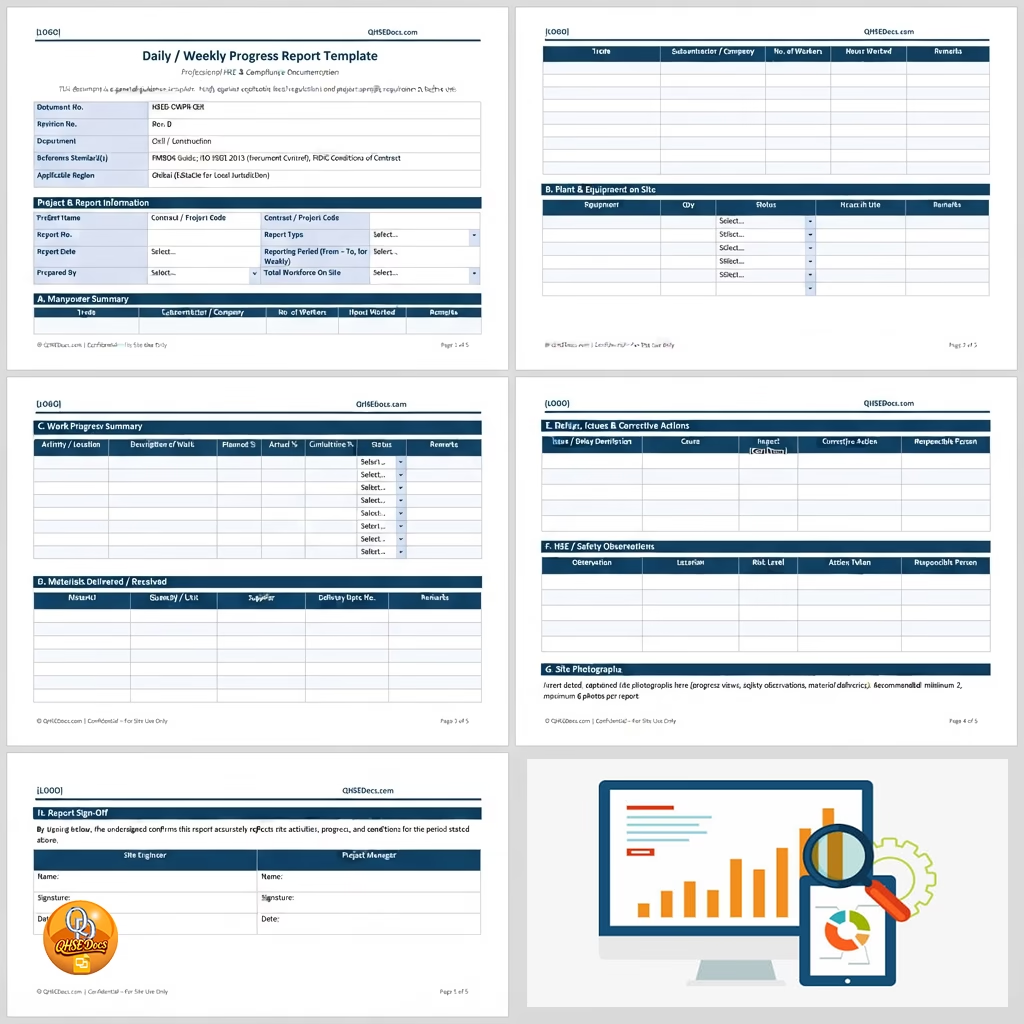
The daily & weekly progress report helps construction teams record project progress, site activities, resources, and key issues. It gives QHSE professionals a clear reporting structure for daily and weekly project updates.
Daily & Weekly Progress Report for Construction Projects
This editable Microsoft Word (.docx) document supports organised progress tracking across construction and civil engineering projects. Teams can record completed work, current activities, manpower, equipment, materials, delays, risks, and important site observations.
The report creates a consistent record that supports communication between contractors, supervisors, project managers, consultants, and clients. It also helps teams identify progress gaps and address issues before they affect project delivery.
What the Daily & Weekly Progress Report Covers
The document provides practical sections for recording key project information and monitoring work progress. Users can edit each section to match their project scope, reporting process, and client requirements.
- Project name, project number, and reporting period
- Client, consultant, contractor, and project team details
- Daily work activities and completed tasks
- Weekly work progress and achievement summaries
- Work locations and activity descriptions
- Manpower and workforce details
- Plant, machinery, tools, and equipment records
- Material delivery and material usage information
- Planned work compared with actual progress
- Work progress percentages and key milestones
- Site constraints, delays, and work interruptions
- Health, safety, and environmental observations
- Incidents, near misses, and corrective actions
- Weather conditions and site conditions
- Quality issues and inspection activities
- Risks, concerns, and required actions
- Pending activities and planned next steps
- Management comments and project remarks
- Prepared, reviewed, and approved sections
Who Needs This Document?
This daily & weekly progress report suits professionals who need reliable project reporting and clear site records. Construction teams can adapt the document to different project sizes and reporting systems.
- QHSE officers who monitor site activities and safety performance
- HSE managers who review operational progress and key site issues
- Site supervisors who record daily activities and completed work
- Project managers who monitor progress against planned targets
- Construction managers who coordinate site resources and activities
- Contractors who submit structured progress information
- Consultants who review project progress and site performance
- Engineers who track construction activities and technical work
The document also works well for civil construction, infrastructure, building, maintenance, MEP, and general contracting projects. Teams can use it for internal reporting or client-facing progress updates.
Document Overview, Scope, and Purpose
The report provides a practical framework for recording project progress over daily and weekly reporting periods. It supports consistent communication between site teams, management, contractors, consultants, and clients.
Its scope covers operational progress, workforce information, equipment, materials, site conditions, HSE observations, quality matters, delays, risks, and upcoming activities. The purpose is to create a reliable record that supports informed project decisions.
Project teams can use the report to compare planned work with actual achievements. Regular reporting also helps management monitor trends, identify constraints, and coordinate corrective actions.
International Compliance and QHSE Standards
This document supports structured reporting practices for projects operating under international and global requirements. Users should always review their client specifications, contract conditions, and applicable local regulations before use.
The reporting process can support management systems aligned with ISO 45001 for occupational health and safety and ISO 9001 for quality management. Progress records can help teams maintain documented information and demonstrate consistent operational control.
For international guidance, users can review the ISO international standards published by the International Organization for Standardization. Teams should also consider applicable international occupational safety requirements and recognised industry codes of practice.
QHSE Docs provides this document for international and global use. Users remain responsible for adapting the report to project-specific requirements and applicable jurisdictional rules.
How to Use and Customise the Document
Open the Microsoft Word (.docx) file and replace the sample information with your project details. Add the project name, reporting dates, responsible personnel, and reporting period.
- Enter the project and contractor information.
- Update the reporting date and reporting period.
- Record completed daily and weekly activities.
- Enter workforce, equipment, and material details.
- Document delays, risks, incidents, and site observations.
- Compare planned progress with actual achievements.
- Add upcoming activities and required actions.
- Review the report before submission or distribution.
The editable format lets users adjust headings, fields, tables, and project information. Teams can also add company branding and client-specific reporting requirements.
Related QHSE Documents
QHSE Docs offers additional resources that can support your site documentation system. Explore the BOQ – Bill Of Quantities Form for structured site inspection records.
You can also review the Lifting Plan Method & Risk Assessment Template to support routine workplace safety checks and site monitoring.
For broader documentation needs, consider the Risk Assessment for Cast in-situ-Girder, Pier Cap and Deck Slab to access practical QHSE forms for different workplace activities.
Download the Daily & Weekly Progress Report
Improve project reporting with a practical and editable daily & weekly progress report designed for construction and civil engineering teams. The Microsoft Word (.docx) format makes customisation simple and supports fast reporting across international projects.
Download now and start building clearer progress records for your construction project. Use the instant download to access an editable document that supports organised reporting, better communication, and international compliance.
FAQ”s
Q1: What does this document include?
A1: The daily & weekly progress report includes project details, work activities, manpower, equipment, materials, progress tracking, HSE observations, delays, risks, quality issues, actions, and planned activities.
Q2: What format is the file?
A2: The daily & weekly progress report comes as an editable Microsoft Word (.docx) file. Users can modify project details, tables, headings, and reporting sections to suit their needs.
Q3: Who should use this document?
A3: QHSE officers, HSE managers, site supervisors, project managers, contractors, construction managers, engineers, and other professionals can use this document for project progress reporting.
Q4: How quickly can I download it?
A4: You can access the daily & weekly progress report through an instant download after purchase. The Microsoft Word (.docx) format lets you start editing quickly.
Q5: Can I customise the template?
A5: Yes. You can edit the document in Microsoft Word and customise project details, reporting periods, tables, headings, company branding, and client-specific requirements.